Plans and pricing
Lumen has two plans, and the number of endpoints is what separates them. Free covers a small fleet at no cost and does not expire. Pro lifts the endpoint limit and is charged per endpoint. The plan in force is shown in the console, on the Billing page, and it is changed there.
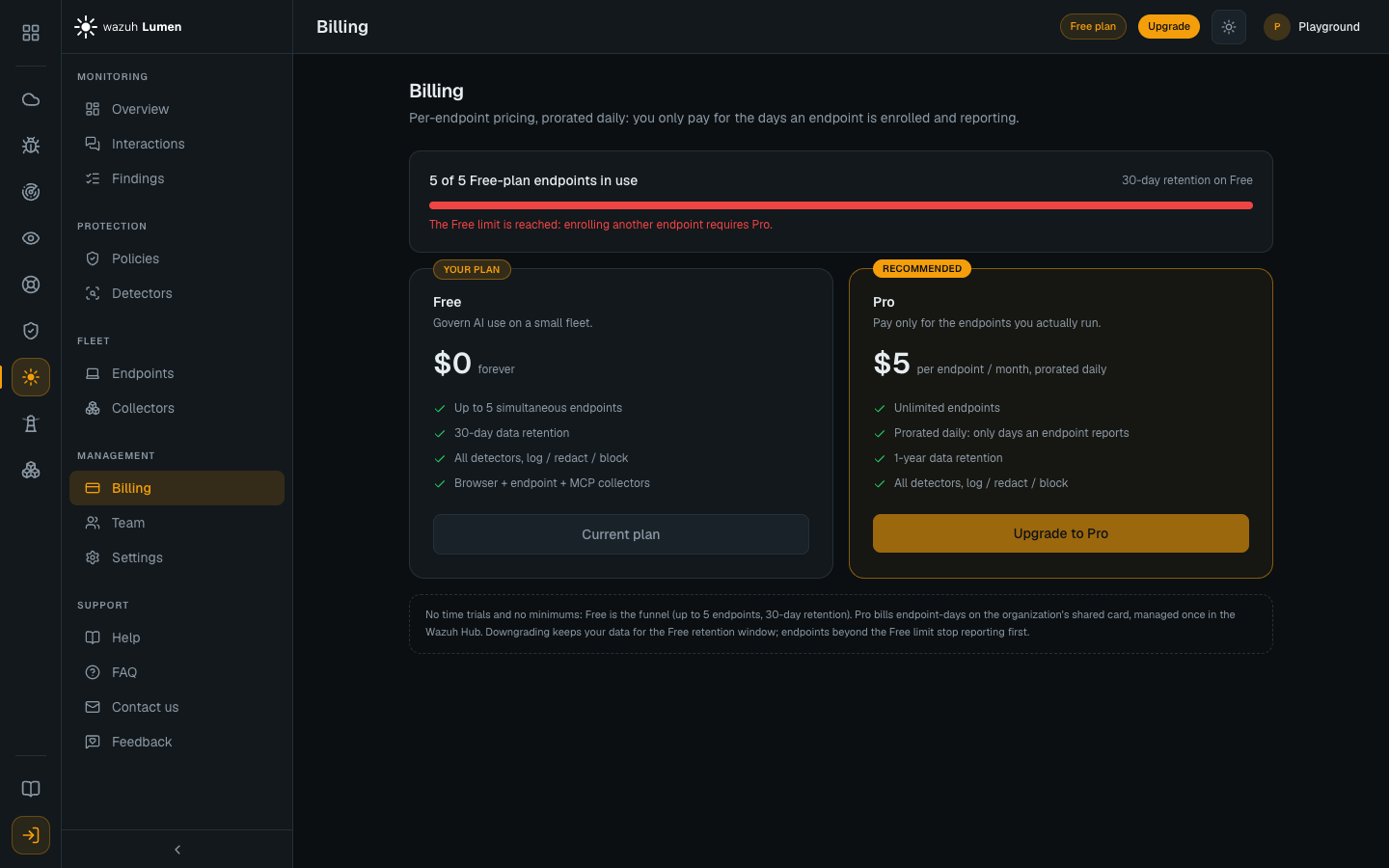
Lumen is in closed beta, and every figure on this page is a beta figure. These prices apply to the organizations testing the service today, and they will change. The beta bar in the console says the same thing: the pricing is work in progress, and what is on screen today is a snapshot, not a promise.
What each plan includes
| Free | Pro | |
|---|---|---|
| Price | $0, forever | $5 per endpoint per month, prorated daily |
| Endpoints | Up to 5 enrolled at once | Unlimited, up to the workspace's spend limit |
| Inspection | Unlimited | Unlimited |
| Text stored, per endpoint per day | 200 prompts and 400 agent events | 500 prompts and 2,000 agent events |
| Data retention | 30 days | 1 year for findings and prompts, 90 days for agent activity |
| Detection classes | All of them | All of them |
| Log, Redact and Block | Yes | Yes |
| Collectors | Every collector that is available | Every collector that is available |
Pro is prorated daily, so an endpoint that reports for part of a month is charged for that part and not for the whole month.
Neither plan limits what is inspected or enforced, and every finding is counted whatever the volume. What each plan bounds is how much text of clean agent traffic the console keeps: past the daily allowance an event is kept as a row without its text, and nothing is refused, paused or charged extra. The exact numbers, borrowing between endpoints, and retention per kind of event are in Service limits.
Which collectors are available today, and which are still to come, is listed per collector in Collectors. The plan does not change that list.
The monthly spend limit
Every workspace carries a limit on what it can spend in a calendar month. It starts at $200, which is about 40 endpoints running all month, and an admin can move it anywhere up to $500 on the Billing page. Above that, the number is arranged with us: use Contact us in the console and we will raise it.
Nothing accrues on Free, so the limit only bites on Pro, and the Billing page shows the card there. The precise figure is endpoint-days: $200 buys 1,200 of them, so 40 endpoints reach it on the 30th day of the month and 39 endpoints never do.
Reaching the limit pauses reporting for the whole fleet, and it is worth knowing what that does and does not mean before you change it:
- every endpoint keeps inspecting and enforcing locally against the policy it already has, exactly as it does through a network outage. Nothing stops being protected;
- what stops is the cloud half: new telemetry, console visibility, policy updates and agent upgrades.
Raising the limit resumes reporting within about 15 minutes, with nothing to restart, and the window resets on the 1st. Spend counts what was actually billed, so days a sponsorship already paid for do not consume the limit.
Reaching the endpoint limit
The Free allowance counts the endpoints that are enrolled, not the ones that are reporting. An offline machine still holds its slot, and removing an endpoint frees it.
An enrollment that would take an organization past its allowance is refused when the agent enrolls. The enrollment token is not consumed by the refusal, so the same install command works once there is room, either because an endpoint was removed or because the organization moved to Pro. See Endpoints.
Cancelling Pro
Cancelling takes effect the next day. From then the organization is on Free, so you are not charged for the remaining days of the month, and the invoice for the days you did use is generated at the end of the billing month as usual. If you re-subscribe before the month ends, billing simply continues and nothing is interrupted.
Moving from Pro back to Free
If an organization has more than five endpoints when it returns to Free, the five it has run the longest stay active and the rest are suspended. A suspended endpoint is not removed and its agent is not uninstalled: it keeps its place, stops monitoring, and is not charged. Upgrading to Pro again reactivates every suspended endpoint automatically. An admin can also choose which five are active from the Endpoints page, by suspending one endpoint to free a slot and then activating another. See Endpoints.