Install the agent
One command installs the endpoint agent, registers it as an OS service, and,
with the token the console prints, enrolls it into your tenant. On macOS and
Linux it also routes the machine's AI tooling at the agent's capturing proxy.
The browser extension is armed too on Windows and Linux,
where the installer force-installs it from the Chrome Web Store (in Edge on
Windows, only on a machine joined to an Active Directory domain; on Linux, only
in Google Chrome and Chromium installed from a .deb or .rpm, and the
installer prints a NOT COVERED: line for each snap or flatpak browser, Brave
or Firefox it finds); on macOS it takes an MDM profile, or one click on the
Chrome Web Store listing.
What the installer does, per platform
has the details.
Every fresh install starts in monitor mode: every detector your policy
references runs, every match is recorded, and nothing is redacted or blocked. The policy the installer
writes and the one the console assigns on enrollment, Local default, both
set every rule to Log, so the install summary reads
MONITOR - every detector the policy references runs and nothing is redacted or blocked
and says how to enforce: duplicate Local default in the console, promote rules
on the copy, assign it, and switch the endpoint to Enforcing. In the console,
Enforce with the recommended policy on the endpoint does the same in one
confirmed step, with the built-in Recommended enforcing policy. See
From monitor to enforce.
From the console (the normal way)
You do not have to assemble the command yourself. In the console, Endpoints → Enroll mints a single-use token and prints the exact install command with the token filled in, then waits for the machine to report in.
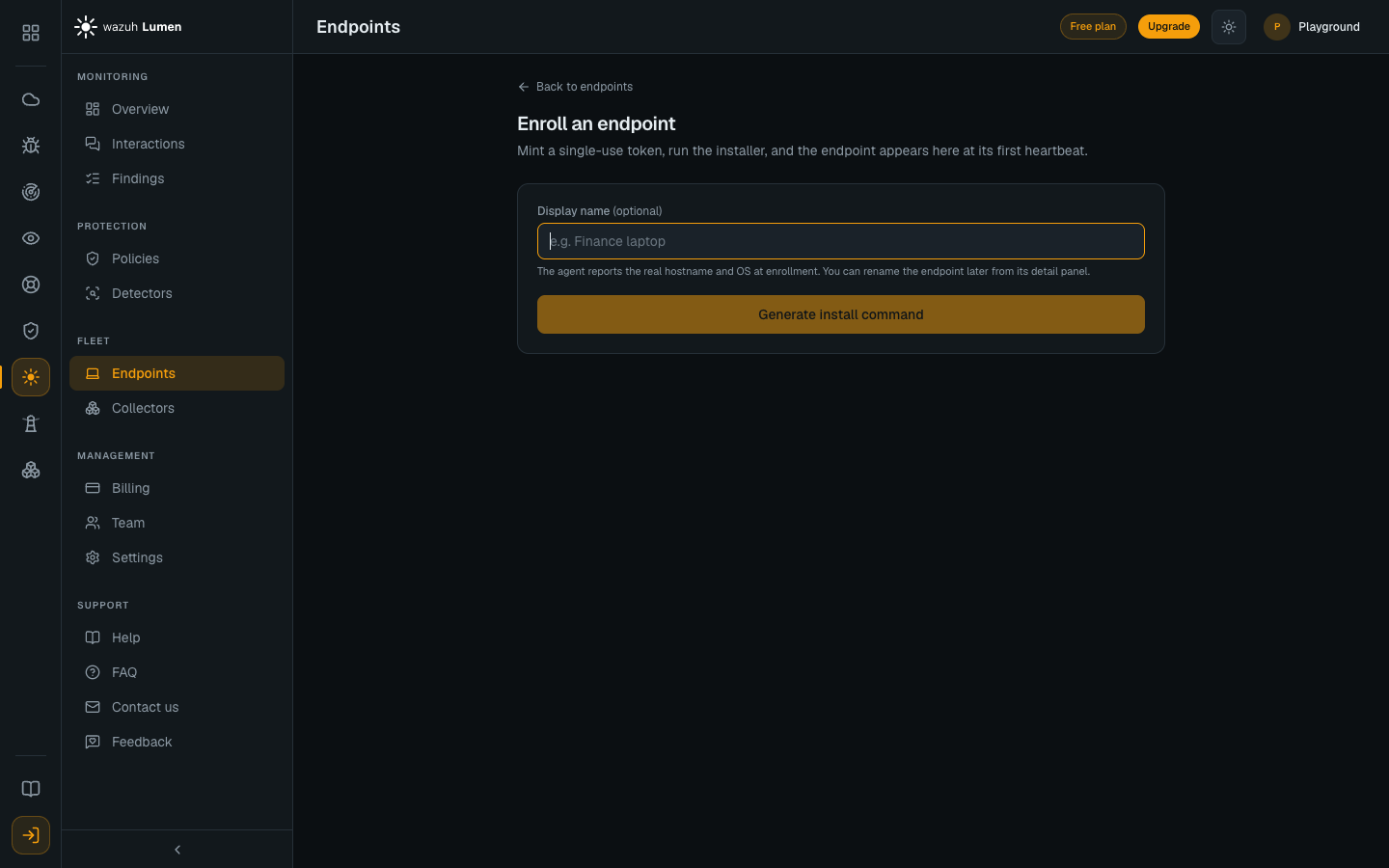
Run the printed command on the target machine and the endpoint appears in the fleet at its first heartbeat. Everything below is what that command is, for mirrors, air-gapped sites, MDM and self-managed installs.
The one-liner
- Linux / macOS
- Windows
curl -fsSL https://dl.lumen.wazuh.com/install.sh | sudo sh
# From an elevated prompt
& ([scriptblock]::Create((irm https://dl.lumen.wazuh.com/install.ps1)))
The installer resolves the latest release, downloads the archive for your OS
and architecture, verifies it against SHA256SUMS, installs the binary
and a starter config, and registers the OS service. Re-running it is an
upgrade, and your edited config files are never overwritten.
On Linux and macOS, once the service is running and, with a token, enrolled,
install.sh runs lumen-agent autoconfig apply, so the endpoint is capturing
when the command finishes rather than waiting on a step nobody mentioned. With
--no-service it stops before this step. It resolves the person
who ran sudo and routes their tooling, not root's, and changes their
files as them, so they stay theirs. Run from a shell that is already root
(sudo -i, then the command above), it finds that person through their login
session instead. If it can only find root, it prints a warning: fix it with
sudo lumen-agent autoconfig apply --user <login name> and
sudo lumen-agent inventory install --user <login name>.
See what it did with lumen-agent autoconfig status, and undo it with
lumen-agent autoconfig revert. Routing never fails the install: if it cannot
run, the installer says so and the agent still inspects everything sent to it
directly. See Local proxy & autoconfig.
On Windows, install.ps1 does the same once the service is running (not with
-NoService): it registers the Claude Code hooks, which also cover Claude
Desktop's Code tab, for the account that runs the installer. Windows has no
--user, so if an administrator elevated the prompt from someone else's
session, the hooks are the administrator's: the installer says so and prints
the command that person should run from their own PowerShell,
& 'C:\Program Files\Lumen\lumen-agent.exe' autoconfig apply --agent-config 'C:\ProgramData\Lumen\agent.yaml'.
The hooks need Claude Code 2.1.139 or later on Windows.
Add --token=<enrollment token>, or -Token on Windows, when enrolling into
a tenant. The console's enroll wizard prints the full command with the token
filled in.
The installer finishes with a line starting CONNECTED:, which names the
endpoint id, or NOT CONNECTED, followed by what the agent said. Re-running it
with a new token on a machine that was enrolled before moves that machine:
the agent tries the token first and replaces its stored credential only when
your tenant accepts it, keeping a copy of the old one, and the installer names
the endpoint it replaced. The old endpoint stays listed, offline, in the tenant
it was in. A token that was already used or has expired changes nothing: if
the machine's own credential still works, the installer prints CONNECTED as
the endpoint the machine already is, followed by a WARNING that the token you
passed was not used and how to move the machine if it is in the wrong
organization, and finishes the rest of the install. That is what you see when
you re-run the line a machine first enrolled with on an earlier release.
Useful flags: --version vX.Y.Z, --no-service, --prefix DIR for a
rootless sandbox install, --base-url URL for mirrors and air-gapped sites,
and --uninstall.
Native packages
.deb, .rpm and a universal macOS .pkg ship with each release:
- Debian / Ubuntu
- RHEL / Fedora / SUSE
- macOS
apt install ./lumen-agent_*.deb
dnf install ./lumen-agent-*.rpm
installer -pkg lumen-agent_*_darwin_universal.pkg -target /
Config files are marked as conffiles, so local edits survive upgrades. Every
release that changes the agent publishes the packages under
https://dl.lumen.wazuh.com/<release>/, latest/ always holds the newest of
them, and each release's SHA256SUMS lists every file by name.
From the release archive
Each release also ships a plain archive per platform: one static binary plus
the sample agent.yaml and policy.yaml. Download it from the location the
installers use, check it, and unpack it:
rel=$(curl -fsSL https://dl.lumen.wazuh.com/latest/VERSION)
curl -fsSLO "https://dl.lumen.wazuh.com/$rel/lumen-agent_darwin_arm64.tar.gz"
curl -fsSLO "https://dl.lumen.wazuh.com/$rel/SHA256SUMS"
grep ' lumen-agent_darwin_arm64.tar.gz$' SHA256SUMS | shasum -a 256 -c -
tar -xzf lumen-agent_darwin_arm64.tar.gz
./lumen-agent_darwin_arm64/lumen-agent version
Use darwin_amd64 on an Intel Mac. Running and verifying the binary by hand
(version, inspect, status) is covered in the
Agent reference. No service, no
root, no cloud.
What the installer does, per platform
macOS is the supported platform today. Linux and Windows builds ship with every release, but they are not yet tested or supported, and Windows has known gaps listed below. Run evaluations and proofs of concept on macOS.
| macOS | Linux | Windows | |
|---|---|---|---|
| Support level | Supported | Preview, not tested | Preview, not tested |
| Agent, OS service and enrollment | Yes | Yes | Yes |
Routes AI tooling at the proxy (autoconfig apply) | Yes, for the person who ran sudo | Yes, for the person who ran sudo | Yes, for the account that ran the installer: the Claude Code hooks, and the shell only in Git Bash (see below) |
| Browser extension force-install | No. Needs an MDM configuration profile | Writes the browser's managed-policy file, which reaches Google Chrome and Chromium from a .deb or .rpm; not a snap or flatpak browser, Brave or Firefox (see below) | Writes the registry policy for the Chrome Web Store build, which Chrome honours on any machine, managed or not, and Edge only on a machine joined to an Active Directory domain |
| Native-messaging host the extension talks to | Registered machine-wide (/Library/Google/Chrome/NativeMessagingHosts/ and the Edge and Chromium equivalents), for every user | Registered machine-wide (/etc/opt/chrome/native-messaging-hosts/ and the equivalents), for every user | Registered machine-wide: HKLM keys pointing at %ProgramFiles%\Lumen\nm\, for every user, even when the installer runs as SYSTEM |
| Service log | /var/log/lumen/ | the systemd journal | the Application event log, source lumen-agent, and C:\ProgramData\Lumen\state\crash.log for a crash |
What this means for the browser:
-
On macOS the extension is not installed for you without an MDM configuration profile. Install it from its Chrome Web Store listing: the native-messaging host is already registered, so it reaches the agent as soon as it is installed. See Install on an unmanaged browser. That copy is user-removable, so treat it as an evaluation path.
-
On Windows Chrome force-installs the store build on any machine. Chrome honours
ExtensionInstallForcelistfor an extension hosted on the Chrome Web Store whether or not the machine is managed. Edge does not: on a machine that is not joined to an Active Directory domain it force-installs only from Microsoft Edge Add-ons, so there the extension is added to Edge by hand from the listing. The self-hosted CRX, the alternative for a fleet that cannot reach the store, is force-installed only on a managed machine. See Deploy on managed browsers. -
On Linux the extension reaches Google Chrome and Chromium installed from a
.debor.rpm, which read the managed-policy file and the machine-wide native-messaging host the installer writes. It does not reach:- a snap or flatpak browser, whose sandbox cannot launch the host. On
Ubuntu, Firefox is a snap, and so is the Chromium that
apt install chromium-browserinstalls; - Brave, in any packaging: it is not supported yet;
- Firefox, in any packaging: Lumen has no Firefox build yet.
After the browser step the installer prints one
NOT COVERED:line for each of these it finds, for exampleNOT COVERED: Chromium (snap): its sandbox cannot launch the Lumen host; use Google Chrome from its .deb or .rpm for AI sites. Use Google Chrome from its.debor.rpmfor AI sites. Microsoft Edge for Linux has not been verified and the installer does not name it, so use Google Chrome there too. See Browser support today. - a snap or flatpak browser, whose sandbox cannot launch the host. On
Ubuntu, Firefox is a snap, and so is the Chromium that
-
An endpoint installed by v2.9.0 or earlier needs the one-liner re-run to get the store build and, on Windows, a native-messaging host its browsers can reach. An agent self-upgrade replaces the binary and nothing else.
On Windows, autoconfig apply registers the Claude Code hooks, which cover
the Claude Code CLI and Claude Desktop's Code tab (prompts and tool calls, not
the model's replies). Its shell routing is a POSIX shell profile, which
PowerShell and cmd never read, so it is written only where Git Bash has a
.bashrc or .bash_profile; otherwise autoconfig status reports that there
is no shell profile to route, and SDK scripts started from PowerShell are not
routed. Claude Desktop's chat and the ChatGPT desktop app are not captured.
Install layout
| Path | Contents |
|---|---|
/usr/bin/lumen-agent for deb and rpm, /usr/local/bin/lumen-agent for the script and pkg | the binary |
/etc/lumen/agent.yaml | agent config |
/etc/lumen/policy.yaml | policy, shipped in monitor mode |
/etc/lumen/disabled | the off-switch marker, absent unless lumen-agent disable wrote it |
/var/lib/lumen/ | spool and findings |
/var/log/lumen/ | launchd stdout and stderr on macOS |
On Windows: C:\Program Files\Lumen\lumen-agent.exe and
C:\ProgramData\Lumen\ for config and state. install.ps1 adds
C:\Program Files\Lumen\cli to the machine Path, so lumen-agent status
works in the window the installer ran in and in any PowerShell or Command
Prompt opened after it. That directory holds only a lumen-agent.cmd that
runs the agent, and only administrators can change it. After an install that
ran as SYSTEM (Intune, an RMM, SSM), new windows get the Path entry from the
person's next sign-in. -Uninstall removes the entry and the directory.
On an endpoint installed by an earlier release, where lumen-agent is still
"not recognized", run install.ps1 again: the agent's own upgrade replaces the
binary and nothing else, so only the installer adds the entry. Until then, run
it by its full path: & 'C:\Program Files\Lumen\lumen-agent.exe' status.
Many machines, or an air-gapped site
Both installers download from https://dl.lumen.wazuh.com by default, and
--base-url on the shell installer, or -BaseUrl on the PowerShell one,
points them at any HTTP server that reproduces the same layout. The release
files are served over plain HTTPS, so a mirror needs no credentials and no
cloud tooling.
Three paths matter under the base URL:
| Path | What it is |
|---|---|
latest/VERSION | the newest release tag, read only when no version is named |
<release>/SHA256SUMS | the checksum manifest each installer verifies against |
<release>/lumen-agent_<os>_<arch>.tar.gz | one platform archive. Windows installs take the .zip of the same name |
Copy a release into the mirror from a machine that has internet access, listing the platforms the fleet actually runs:
rel=$(curl -fsSL https://dl.lumen.wazuh.com/latest/VERSION)
mkdir -p "/srv/lumen/$rel"
for f in SHA256SUMS \
         lumen-agent_linux_amd64.tar.gz \
         lumen-agent_linux_arm64.tar.gz \
         lumen-agent_darwin_arm64.tar.gz; do
  curl -fsSL -o "/srv/lumen/$rel/$f" "https://dl.lumen.wazuh.com/$rel/$f"
done
Then install from the mirror, naming the same release:
sh install.sh --base-url https://mirror.internal/lumen --version "$rel"
Mirroring latest/VERSION as well lets the version flag be dropped, at which
point the installer resolves whichever release the mirror carries.
SHA256SUMS is the integrity story today and the installers enforce it.
Gatekeeper blocks a double-clicked macOS .pkg, so install it from the
command line or via MDM. SmartScreen warns on Windows.