From monitor to enforce
A fresh install starts in monitor mode, twice over: the policy every
endpoint is assigned when it enrolls, Local default, sets every rule to
log, and the endpoint itself starts at Monitoring. Every detector the policy
references runs, every match is recorded, and nothing on the machine is
redacted or blocked. Monitor mode does not run a detector that no rule
references, so to size a rule before adopting it, add it to the policy at
log and watch what it catches. Blocking legitimate work is as costly as
missing an attack, so the intended path is: collect, tune, then enforce,
and enforcing is always something you decide, never a default.
What holds an endpoint in monitor mode
Two separate things can, and a machine acts on its policy only when neither does.
| Gate | Where it lives | How it is lifted |
|---|---|---|
Every rule in the policy is set to log | The policy assigned to the endpoint: Local default, until you assign another | Assign the built-in Recommended enforcing, or duplicate Local default, promote rules on the copy, and assign it |
| The endpoint's enforcement mode is Monitoring | The console, per endpoint | Switch the endpoint to Enforcing |
Both are lifted in the console, and both are necessary: a promoted policy on a
Monitoring endpoint is held at Log, and an endpoint at Enforcing on Local
default has nothing to enforce. On Local default, lumen-agent policy effective
prints MONITOR - every detector the policy references runs and nothing is redacted or blocked whatever the endpoint's mode, and the installer summary
says how to enforce. Once a promoted policy is assigned and while the second
gate holds, every surface says so rather than showing the policy's rules as in
force:
lumen-agent status and lumen-agent policy effective print
MONITOR (console ceiling); the policy would: <rules>, the installer summary
repeats it, and every finding the agent's daemon records carries
action.mode: "monitor" with what the policy wanted in action.intended. For
the few seconds between an agent restart and its first heartbeat the two
commands print MONITOR (agent default until the console's first heartbeat)
instead: a connected agent holds every rule at log until the console states
the endpoint's mode, and it does not claim that is the console's decision.
The switch reaches every collector on the endpoint: the agent's capturing proxy and inspection API, and the Claude Code hook guard, the MCP wrapper, the browser extension's native-messaging host and a standalone lumen-agent proxy, which read it from the state the agent's daemon keeps beside its config. When one of those cannot read it, it holds at Log too. So promoting a rule while
the endpoint is still Monitoring changes nothing, and switching an endpoint to
Enforcing while every rule is still Log changes nothing either: acting takes
both. On an agent at v2.10.0 or earlier the switch reaches the daemon only, and
those four still redact and block as a promoted policy says at Monitoring,
recording action.mode: "enforce"; upgrade the agent to hold them at Log. See
Endpoints and Policies.
The shortest path: the recommended policy
Every organization also has a second built-in policy, Recommended
enforcing: Local default with the usual promotions already made
(pr_injection and pr_malicious_url block, pr_secrets and the case-id
definition redact, everything else logs). On an endpoint whose policy only
logs, the detail panel offers an admin Enforce with the recommended policy.
It asks first, and the confirmation names both changes: the policy it replaces,
and that the endpoint starts redacting and blocking live traffic. Confirmed, it
assigns Recommended enforcing and switches the endpoint to Enforcing, and the
machine picks both up at its next check-in.
That lifts both gates in one step, which is what an evaluation or a pilot on a few machines needs: a leaked key is redacted and a prompt injection is blocked from the next check-in on. For a fleet, the path below is still the one to follow, because it decides on your own traffic what each rule should do before it can stop anybody's work. Switch to monitor puts the second gate back at any time, with the limits described above; to stop every surface acting, assign Local default again.
1. Collect on real traffic
Run in monitor mode long enough to see your organization's actual AI use. The Overview and the Findings list are the tuning corpus: the top firing rules card shows which rules would be doing the work, and filtering Findings by class and rule shows what each one is catching before it can act on anyone.
In monitor mode nothing is redacted in flight: a key in a prompt reaches the
provider as typed. The finding does not keep it. Every matched value is stored
as [MASKED:<label>], so the tuning corpus shows what was caught without
holding it. Promoting the sensitive-data rule to Redact is the change that stops
credentials leaving the endpoint. See What Lumen stores.
2. Promote a rule
An admin can edit a policy in place, and every endpoint it is assigned to picks up the new version at its next check-in. The built-in policies cannot be edited, and every endpoint starts on Local default, so the first promotion always starts from Duplicate as new, on Local default or on Recommended enforcing. The usual promotions are the injection and malicious-link rules to Block and the sensitive-data and case-id rules to Redact; see Policies. In the builder, promoting the sensitive-data rule is one control — change its action from Log to Redact:
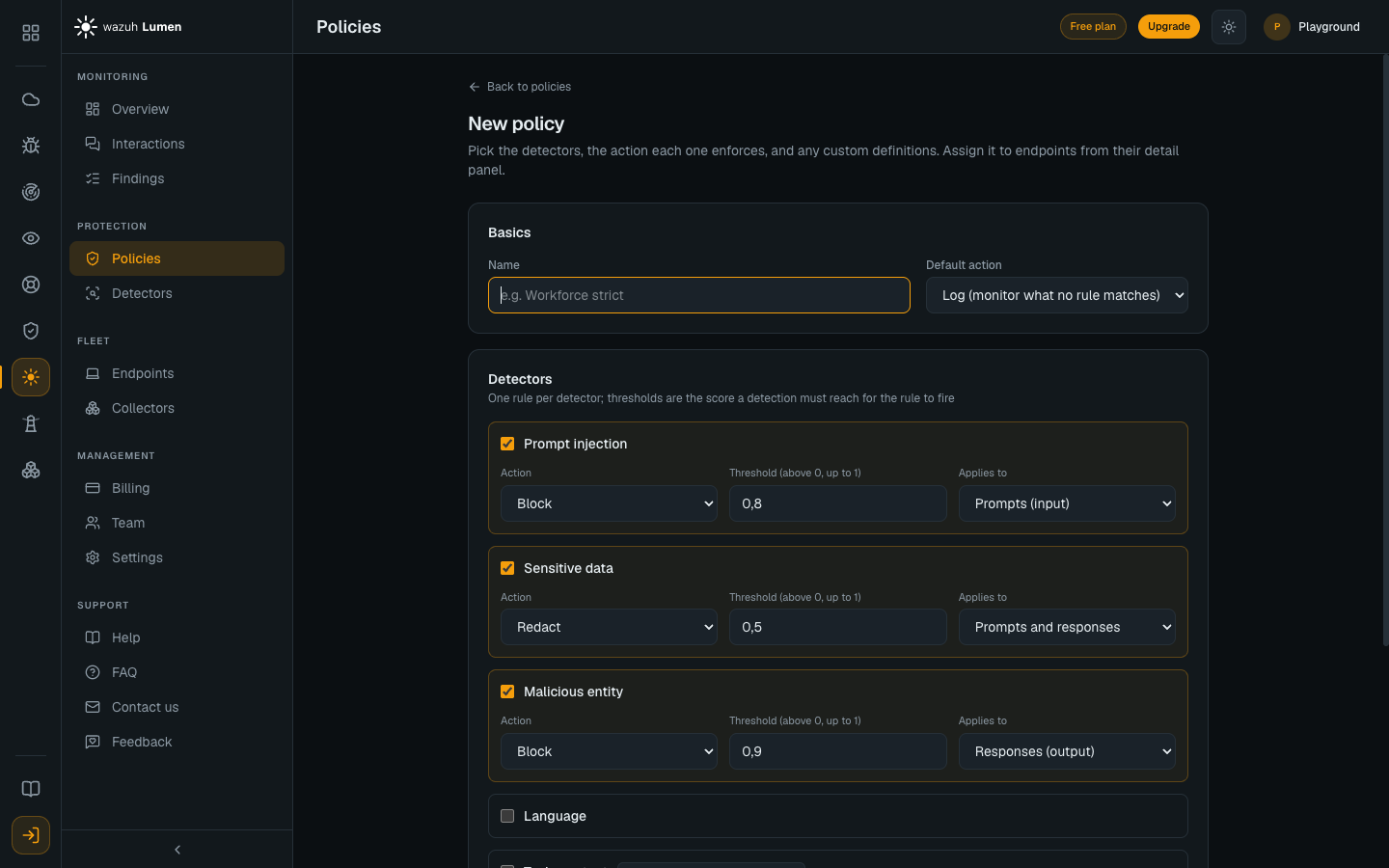
Before saving, Copy as JSON or Download the draft and try it on a
machine with the agent: lumen-agent policy validate --policy <file> checks it
the way the agent checks a console push, and lumen-agent inspect --policy <file> --text "..." shows what it would do to a prompt, with the agent's own
engine. See Testing a policy before you assign it.
If you duplicated, which the first time you always do, assign the new policy to the endpoint from its detail panel. Starting from the endpoint saves that step: Duplicate this policy in its enforcement confirmation opens the builder with the endpoint attached, and saving assigns the copy to it and takes you back. The machine pulls the change at its next check-in and reloads it with no restart. The full policy workflow is in Policies.
3. Switch the endpoint to Enforcing
Promoting the rule lifts the first gate. The second is per endpoint, on its detail panel: Start enforcing. Until then the console caps every verdict at Log, whatever the policy says.
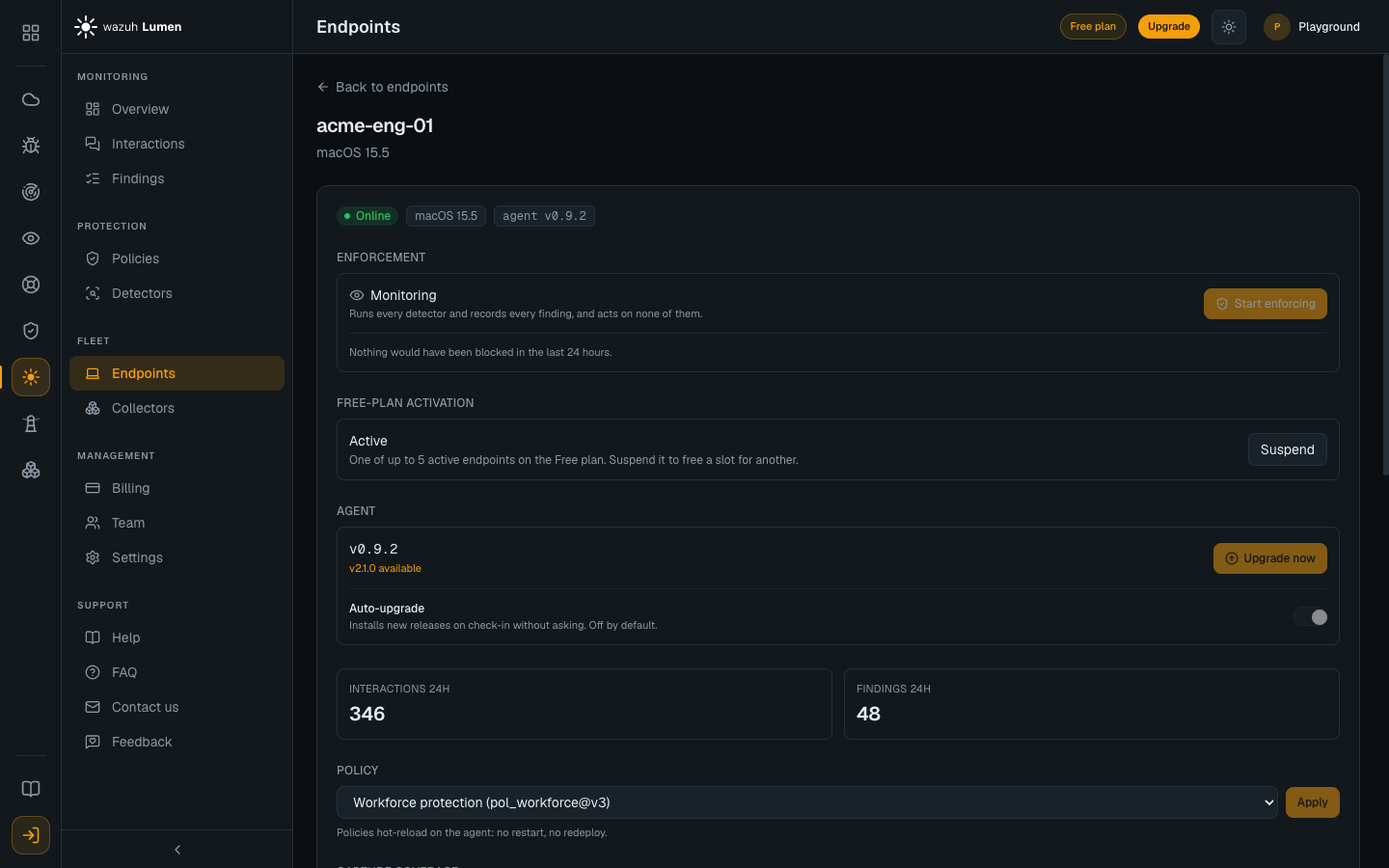
An endpoint in Monitoring reports how many interactions in the last 24 hours its policy wanted to block and did not — the measured cost of the decision, and the number worth reading before you make it. On Local default that number is always zero, because the policy never asks for more than Log; it means something once a promoted policy is assigned. Start enforcing asks for confirmation, because it is the direction that can interrupt someone's work; Enforce all does the same for every endpoint still monitoring. Each machine picks the change up on its next check-in. See Endpoints.
Failure posture
Lumen fails open: when detection itself fails, or a verdict does not arrive in time, the interaction proceeds unchanged. Lumen never becomes an outage in the user's AI tool, and the cloud is never in the request path, so an unreachable control plane changes nothing about inline enforcement.
A policy has no fail-closed setting today. The one place that can fail closed
is the LiteLLM gateway plugin, per gateway,
with LUMEN_FAIL_OPEN=false.
On a machine you run directly — offline, or never enrolled — the first gate is
the local policy.yaml and there is no second gate. Tuning against the on-disk
findings and promoting a rule in the file is covered in
Reading findings on the endpoint and
Policy file format.