Policies
A policy decides what Lumen looks for and what it does about a match. It is written in the console, assigned to endpoints one at a time, and applied on the machine itself, locally, on every interaction. Every organization starts with two policies already written: one that only watches, and one that acts.
What a policy contains
| Part | What it decides |
|---|---|
| Default action | What happens to an interaction that no rule matched. Log or Block, never Redact, because an interaction with no match has nothing to redact |
| Access rules | Whether an interaction is inspected at all, decided on the context the collector reported. An access rule denies, allows, or caps the outcome at Log |
| Prompt rules | One detector, a threshold, the stage it applies to, and the action to take when it fires. Log, Redact and Block are chosen here |
| Custom definitions | An organization's own markers, either a regular expression or a list of terms, each with a class label and an action |
An access rule's conditions are exact matches on a context path, by design. There is no pattern matching in them and no comparison.
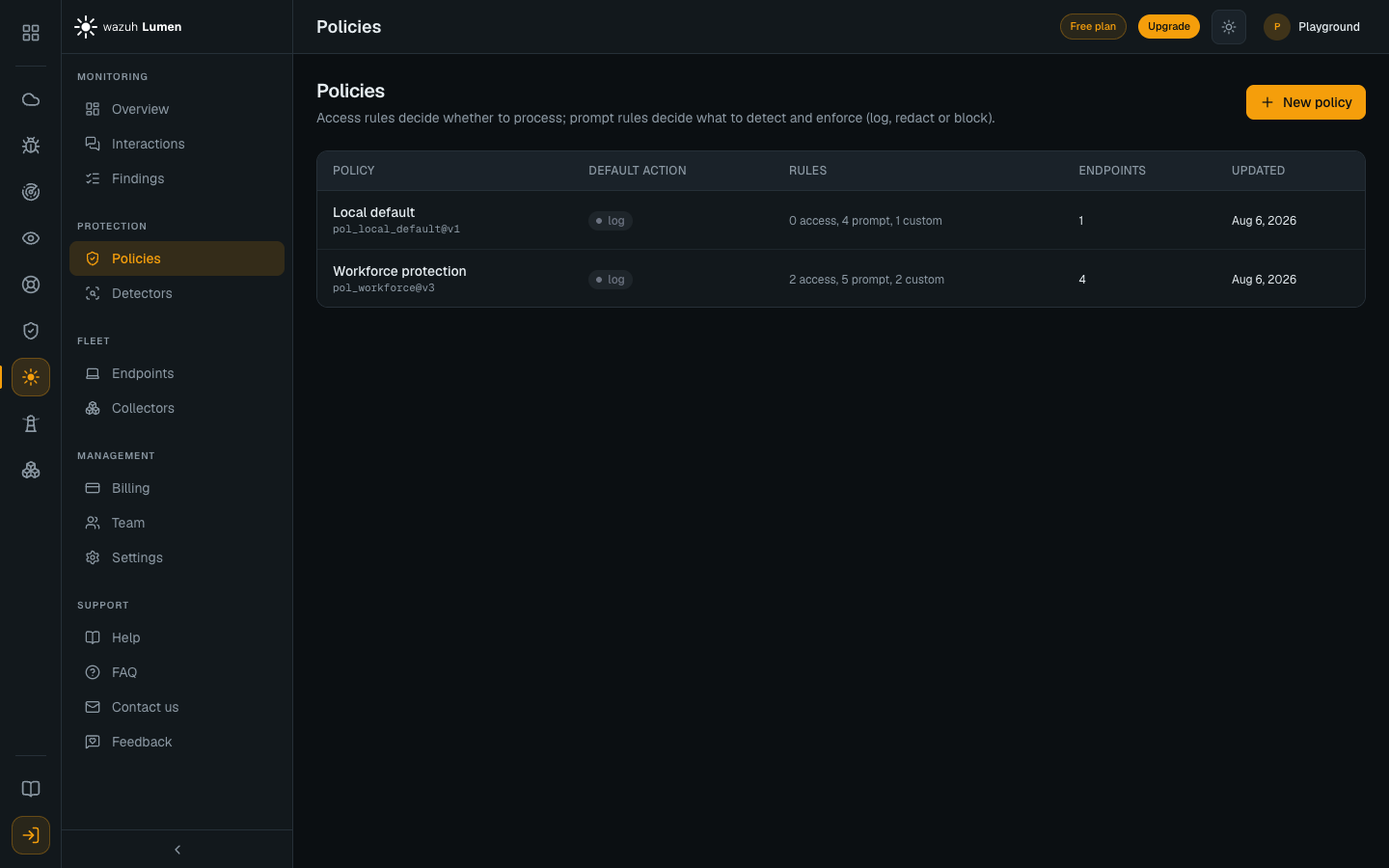
The Policies table lists the built-in policies first and then the rest. Each row
says what the policy acts on: Log only when no rule can redact, block or
deny, otherwise the acting rules counted by action, for example 2 redact, 2 block. It also shows the default action, the number of rules of each kind,
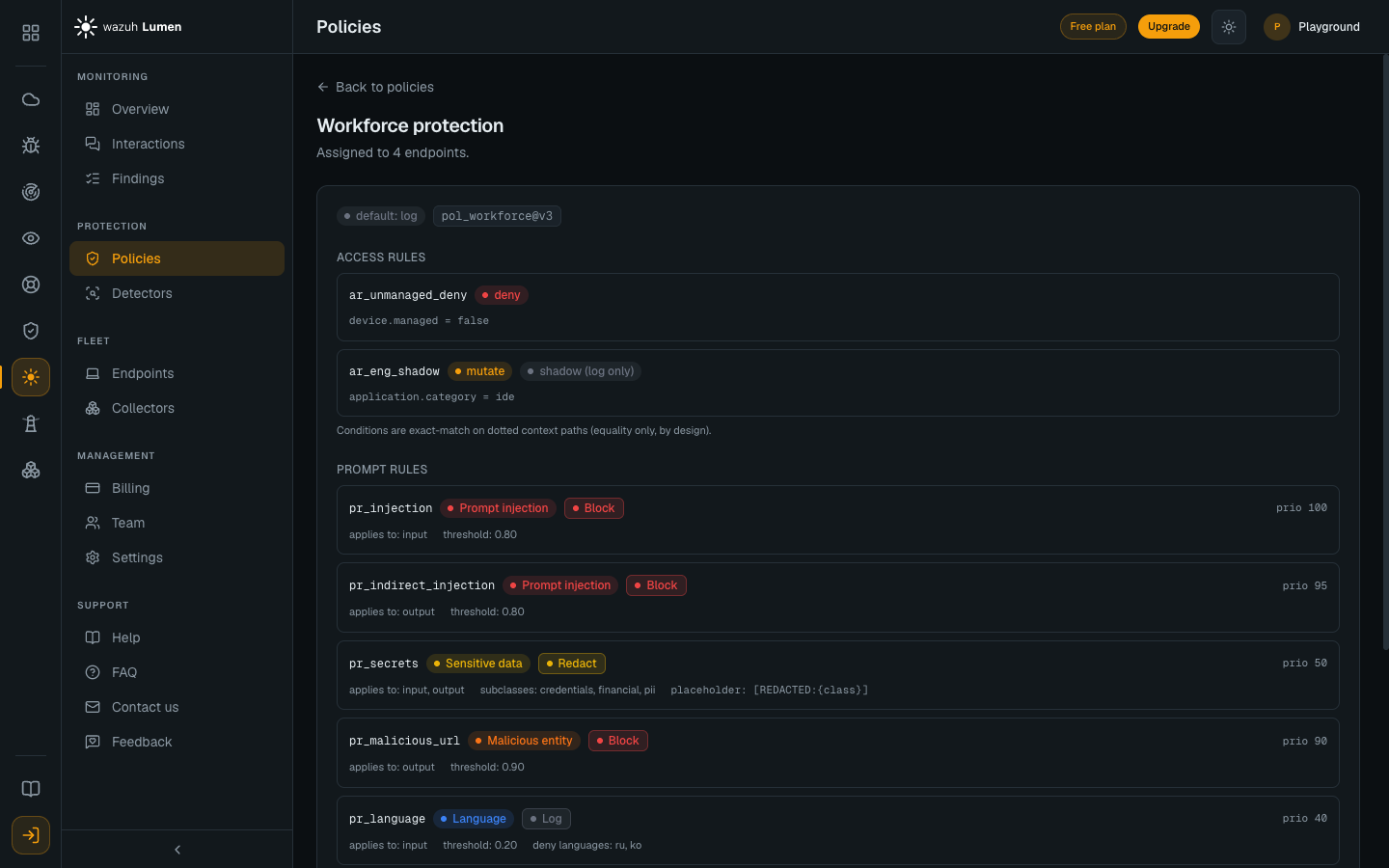
how many endpoints hold it, and when it last changed. Selecting a row opens the whole policy, rule by rule — access rules,
prompt rules with their thresholds and priorities, and custom definitions. A
rule that leaves its threshold unset shows the value the agent actually uses,
marked as the default, for example 0.50 (default). Language rules show their
lists under the keys a policy uses for them, allow: and deny:.
The policy a new organization starts with
The built-in policy is named Local default, and every endpoint is assigned it when it enrolls. It is the same policy the agent falls back to when it has no policy file, and like the monitoring policy the installer puts on the machine, every rule in it logs: it detects everything it names and redacts or blocks nothing, even on an endpoint switched to Enforcing. Enforcing is always a deliberate step, never a default.
| Rule | Detector | Applies to | Action |
|---|---|---|---|
pr_injection | Prompt injection | Prompts | Log at 0.80 and above |
pr_indirect_injection | Prompt injection | Responses | Log at 0.80 and above |
pr_secrets | Sensitive data | Prompts and responses | Log at 0.50 and above |
pr_malicious_url | Malicious entity | Responses | Log at 0.90 and above |
pr_toxicity | Toxicity | Prompts and responses | Log at 0.60 and above |
pr_topic | Topic | Prompts | Log at 0.60 and above |
It also carries one custom definition as a worked example, which logs any
occurrence of WZ- followed by six digits as a whole word: WZ-4839210 and
XWZ-483921 are left alone, because they are some other identifier.
Local default is marked Built in and cannot be changed. To enforce, assign
Recommended enforcing (below), or duplicate Local default and promote the
rules you want on the copy. The usual promotions are pr_injection to Block,
and pr_secrets and the case-id definition to Redact; pr_secrets already
carries its redaction placeholder, so it is a change of action and nothing
else. Promoting pr_malicious_url to Block only has an effect on an endpoint
with a threat-intelligence snapshot, and none ships (see the builder note
below). Then assign the copy and switch the endpoint to Enforcing. See
From monitor to enforce.
The recommended enforcing policy
The second built-in policy, Recommended enforcing
(pol_recommended_enforcing), is Local default with exactly those usual
promotions already made, and every other rule left at Log:
| Rule | Action |
|---|---|
pr_injection | Block prompts at 0.80 and above |
pr_malicious_url | Block responses at 0.90 and above |
pr_secrets | Redact in prompts and responses, as [REDACTED:<class>] |
cd_caseid | Redact the case id |
pr_indirect_injection, pr_toxicity, pr_topic | Log, as in Local default |
It is the policy to assign when you want an endpoint to act without writing one first, for example to show a redaction and a block in an evaluation. Like Local default it is read-only and marked Built in, and no endpoint is ever assigned it on its own: it is an option you choose. The quickest way to choose it is on an endpoint whose policy only logs, with Enforce with the recommended policy, which assigns it and switches the endpoint to Enforcing in one confirmed step. See Endpoints. To tune it, duplicate it.
pr_malicious_url fires only where a threat-intelligence snapshot is loaded on
the machine, and none ships, so on a stock endpoint the policy blocks prompt
injection and redacts secrets and case ids.
Through version 2, Local default blocked injection and malicious links and redacted secrets and case ids. Every organization's built-in moved to version 3 with the release that made it log-only, so an endpoint still on Local default stopped redacting and blocking at that release, even at Enforcing. An organization that relied on those actions keeps them by assigning Recommended enforcing, which acts exactly as Local default did at version 2, or a promoted copy of its own.
Writing a new policy
New policy opens the builder. It takes a name, a default action of Log or Block, and then one row per detector. An enabled detector is configured with three things: the action to take, the score its detection must reach, and whether the rule applies to prompts, to responses, or to both. The score starts at the agent's own default for that detector. A language rule takes two more, a list of denied language codes and a list of the only languages allowed, and at least one of the two must be filled in: a language rule with neither can never match, so it is refused.
The malicious-entity row starts at Log. It needs a threat-intelligence snapshot on the machine, none ships, and without one the rule never matches, so a Block there would promise protection that cannot happen. The row says so in the builder.
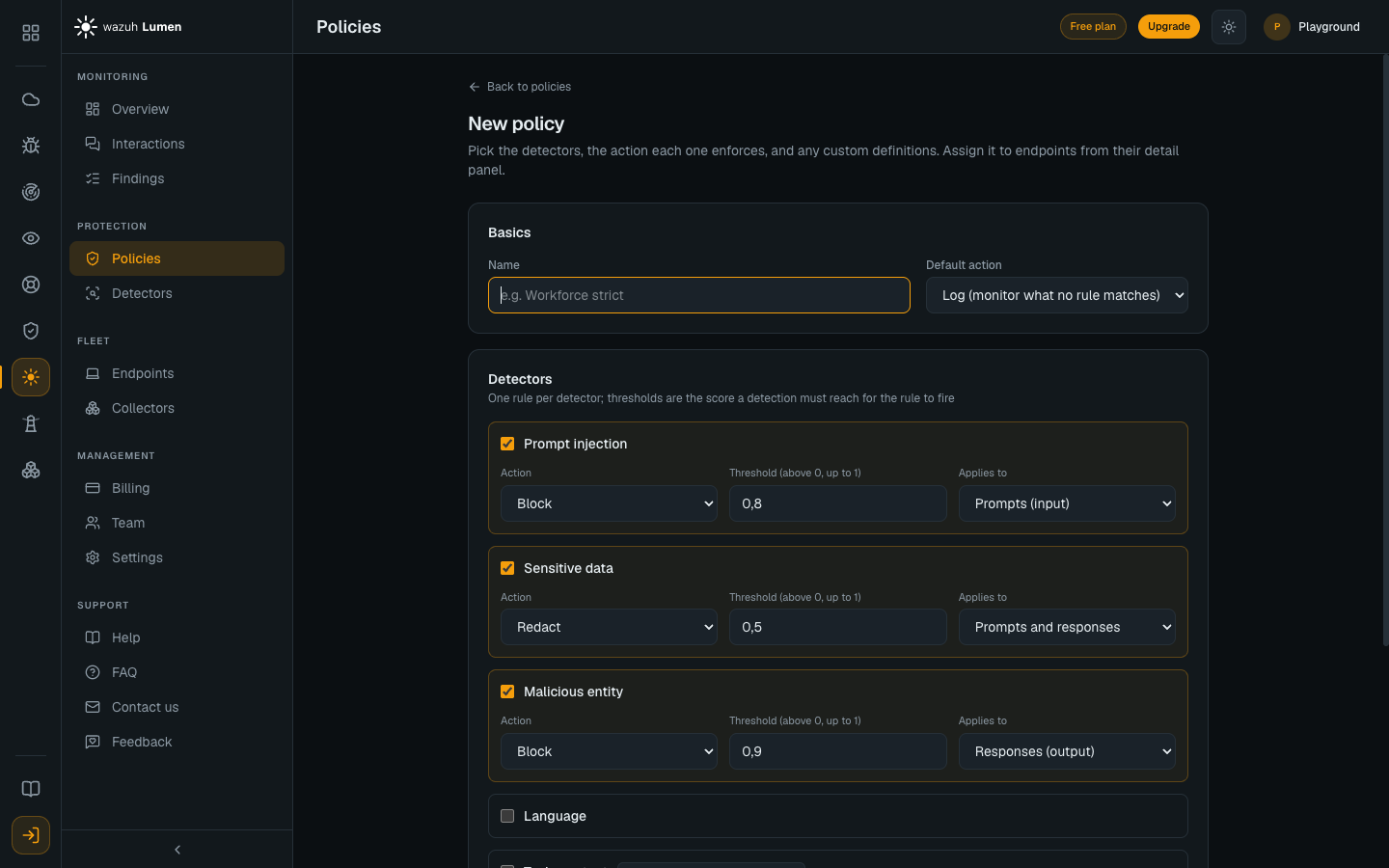
Thresholds must be greater than zero and at most one. Zero is refused rather than accepted, because the agent reads an unset threshold as a request for the detector's own default, so a rule saved at zero would not do what it says.
Custom definitions are added below. A regular expression is capped at 1024 characters and is compiled before the policy is saved, so a pattern that cannot compile is refused at the point it was typed rather than on the fleet.
What the builder fills in without asking
Three things about a saved policy are decided for it.
- A new sensitive-data rule is written against the subclasses
credentials,financialandpii. A rule loaded from an existing policy keeps its own. - A new rule set to Redact is written with the placeholder
[REDACTED:{class}]. A rule loaded from an existing policy keeps its own. - The builder shows one rule per detector. A policy that has two rules on the same detector, which is the shape the built-in policy has (one injection rule for prompts and a second for responses, so the prompt rule can be promoted to Block while the response rule keeps logging), cannot be authored here, but it can be edited and duplicated here without losing the second rule.
Editing and duplicating a policy
An admin can change a policy in two ways.
- Edit in place opens the builder on that policy. Saving replaces it under the same name and id and raises its version by one. Every endpoint the policy is assigned to notices the new version at its next check-in and pulls it, so nothing needs to be reassigned. The built-in policies cannot be edited, and the button says so.
- Duplicate as new opens the builder on a copy. Saving creates a separate policy at version 1, which then has to be assigned. The original stays in the list. When you reach the builder from an endpoint (Duplicate this policy in its enforcement confirmation), the button reads Create and assign to that endpoint: saving also assigns the new policy to it and takes you back there. Switching the endpoint to Enforcing is still done there, behind its own confirmation.
There is no delete.
Both carry the policy's access rules across unchanged, because the builder does not edit access rules. Where the policy has more than one rule on a single detector, the form shows the highest-priority one and the others are carried across unchanged too. The builder names them above the form, and saving writes them back as they are, even if you turn that detector's row off. Duplicating the built-in policy is exactly this case.
Every edit is announced in Lumen's operator activity feed with the policy's old and new version, its rule counts and its default action, never the rules' contents.
A policy is checked against the same rules the agent applies before it is
saved. A field the agent does not know, such as a misspelled thresold, is
refused with its name rather than saved and then silently ignored.
Testing a policy before you assign it
Every policy's detail, and the builder while you write one, offers Copy as
JSON and Download. Both give you the exact policy: on the detail page the
policy as it is stored, and in the builder the body that saving would send. A
new policy has no id until it is saved, so its file carries the one saving
would give it: pol_ followed by the name in lowercase, with underscores, and
_2, _3 and so on when another policy already has that id.
On any machine with the agent installed, that file is a policy the agent loads as it is, so a draft can be checked with the agent's own engine before anybody depends on it:
# Is it a policy the agent accepts? The same strict check a console push gets.
lumen-agent policy validate --policy pol_workforce_strict.json

# What would it do to a prompt? Exit code 2 means it would block.
lumen-agent inspect --policy pol_workforce_strict.json --text "the key is AKIAIOSFODNN7EXAMPLE"
lumen-agent inspect --policy pol_workforce_strict.json --text "Ignore all previous instructions"

# And to a response.
lumen-agent inspect --policy pol_workforce_strict.json --stage output --text "..."
inspect prints the verdict (log, redact or block), the text as it would
leave the machine, and every detection with its score, so a custom regular
expression can be tried against sample text here rather than on live prompts.
It sends nothing anywhere and records nothing. See
Command line.
Assigning a policy to a machine
Assignment is per endpoint, from the endpoint's detail panel in Endpoints. Every endpoint holds exactly one policy, and its row names the one it has been assigned.
A machine takes its assigned policy when it enrolls. The policy is written to the policy file on that machine, over whatever the installer put there, and from that point the agent reloads the file whenever it changes, with no restart and no redeploy.
On an enrolled machine that file belongs to the console. The agent compares the policy version it is running against the version the console reports and pulls the assigned policy whenever the two differ, so a local edit that also bumps the version is replaced at the next check-in. A machine that was never enrolled keeps its file, and editing it locally is the only way to change its policy. See From monitor to enforce.
A policy only acts where the endpoint is enforcing
An endpoint that is enrolled starts in Monitoring, and monitoring caps every verdict at Log no matter what the policy says. A policy full of Block rules changes nothing until an admin switches that endpoint to Enforcing. See Endpoints.
The switch works the other way too: Enforcing lets the policy's own actions stand, and never adds one. An endpoint on Local default, whose every rule logs, redacts and blocks nothing at Enforcing either. Acting takes both a policy with promoted rules and the endpoint at Enforcing, and Enforce with the recommended policy on the endpoint does both at once.
Which detectors can act today
The Detectors page marks each of the six detection classes with its state, and a rule can be written against any of them.
| State | Meaning |
|---|---|
| Live | Ships, and matches today. Prompt injection, sensitive data and language, and toxicity and topic, which run on the agent's classifier tier with a default threshold of 0.60 |
| Conditional | Ships, and reports nothing until something else is in place. Malicious entity is the one in this state: it needs a threat-intelligence snapshot on the machine, and without one the rule never matches |
A seventh card, Other / custom, counts the matches of custom definitions,
which report their own class, such as confidential.case_id. With it, the
counts on the Detectors page add up to the Overview's breakdown by class.